- contact@insightaiviz.com
Product guide
How InsightViz works, end to end
What each part of the console does, how the pieces fit together, and how your organisation stays in control — from the first connection to a question answered.
How it fits together
Every question in InsightViz — from a dashboard, from Explore, or from the assistant — goes through the same path: it is checked against your business definitions, your access rules are applied, and the answer is recorded. The result is one number for every metric, wherever it is asked.
| Part | What it is for |
|---|---|
| Datasources | the databases, warehouses and files you connect; a governed copy of each lives in your own cloud and refreshes on a schedule |
| Business definitions | the dimensions, metrics and relationships with business names — the single vocabulary every dashboard and every AI answer uses |
| Explore | pick fields, see the chart and the table, keep what is useful |
| Dashboards | readable, versioned documents made of charts; published with a note, restorable to any version |
| AI Ask | plain-language questions answered from the definitions, with the working shown |
| Why? | the explanation of any change on any chart — the periods, the drivers, the trend, the next steps — worked out from the rows and checked figure by figure |
| Insights | a question kept as a story — several governed parts, written up, every figure traced, re-run at the reader’s filters; one per dashboard each week |
| Watch | alerts on a number and subscriptions that mail the page, with what changed and the weekly story |
| Import | bring Tableau workbooks and files across, with a review report |
| Governance | workspace roles, row and column access rules, and a record of who asked what |
Workspaces
A workspace is the unit of sharing. Datasources, definitions and dashboards belong to one workspace, and people are owners, editors or viewers of it. A workspace can be visible to the whole organisation or only to its members. Owners manage membership and access rules; editors change content; viewers explore and ask.
Connect your data
Add a database or warehouse connection once (credentials are held securely and never shown again), then create a datasource by naming the tables to bring across. Or drop CSV and spreadsheet files directly. InsightViz keeps a governed copy in your own cloud storage, so dashboards are fast and your operational systems are never slowed down by reporting.
- Refresh on a schedule or on demand. Every refresh is a new version; the previous one is kept, and you can roll back to it.
- Preview any table before you build on it.
- Server-only datasets never leave the server, whatever a person’s device. Use it for anything sensitive.
Business definitions
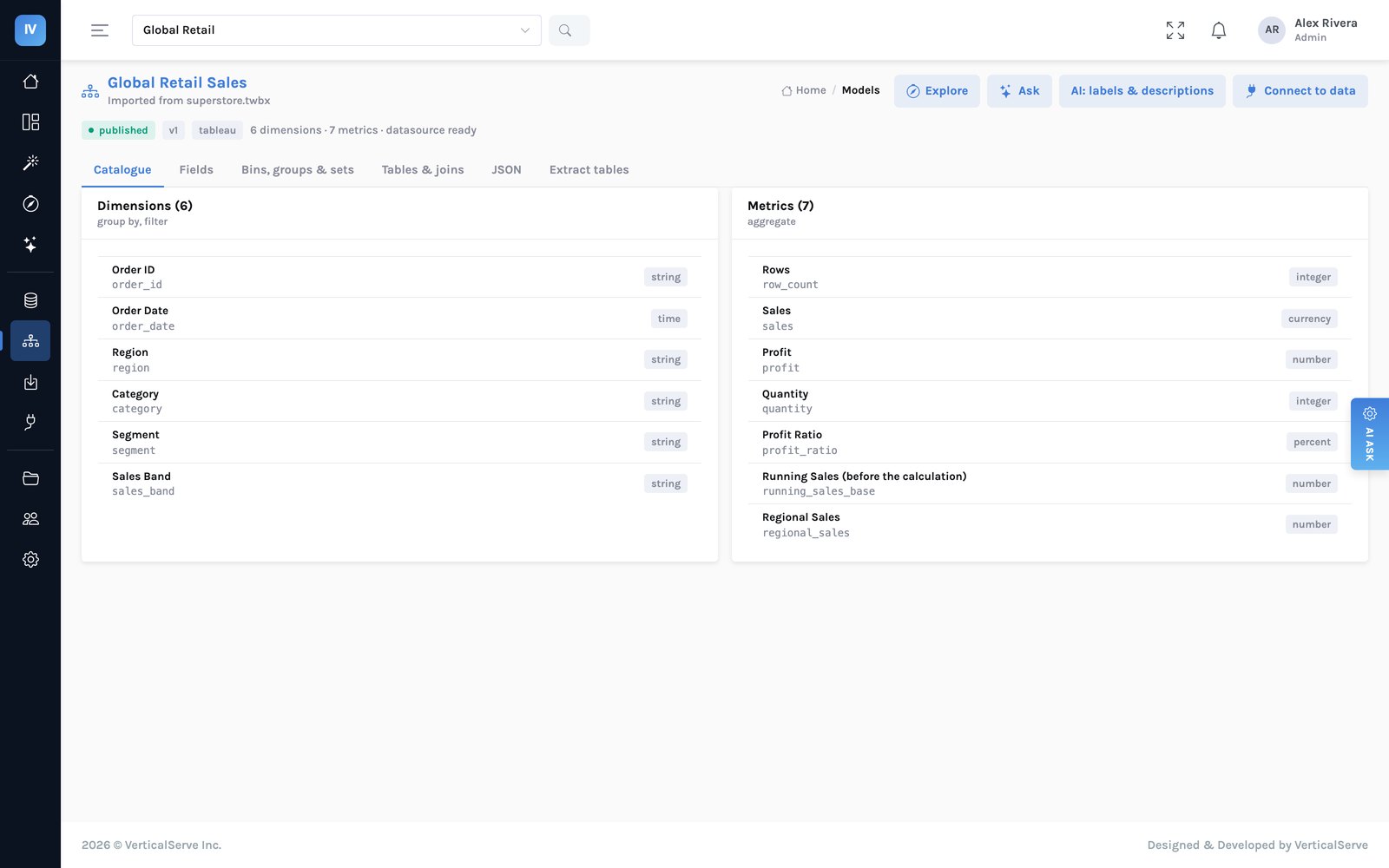
When a datasource first refreshes, InsightViz proposes a set of definitions: every field as a dimension, sensible totals and averages as metrics. From there the owners refine it — business names, descriptions, the other words people use, how tables relate — and the assistant can fill in labels and descriptions for you. Definitions are published with a version, so a change is a deliberate act.
Why this matters. Dashboards, Explore and the assistant all use the same definitions. Net revenue means one thing everywhere. When it changes, it changes once.
Building a dashboard
There are four ways, and all four write the same document, so a dashboard built one way can be edited any other way.
Describe it. Type what the dashboard should show in plain words and the assistant lays it out. It may only use fields the chosen model actually has — every name it proposes is checked against the catalogue, so an invented field is dropped and named rather than becoming a panel that fails the first time someone opens it. Nothing is saved until you press save, so you can compose as many times as you like.
From a picture. Drop a PNG or JPEG of a dashboard — a Power BI page, a Tableau sheet, a slide, a photo of a whiteboard. The picture is read for what the panels are (titles, chart types, roughly where they sit) and every panel is rebuilt over the chosen model’s fields, then checked against the catalogue and put through the compiler like any other. The numbers come from your data, not from the picture. Anything the picture asks for that the model does not have is listed beside the preview — left out, or stood in for and named as such — never swapped quietly.
Design it. The same field picker as Explore: dimensions, metrics, time grains, filters and chart type, with the data previewing as you build and the panel’s own definition visible beside it.
Import it. See Migrate from Tableau.
Editing a panel. Any panel opens an inspector in edit mode: its query, chart type, what is on each axis, how it is coloured, its title, and its size and position. Text panels are written in markdown with a live preview. Panels are dragged to move and resized from the corner.
Explore
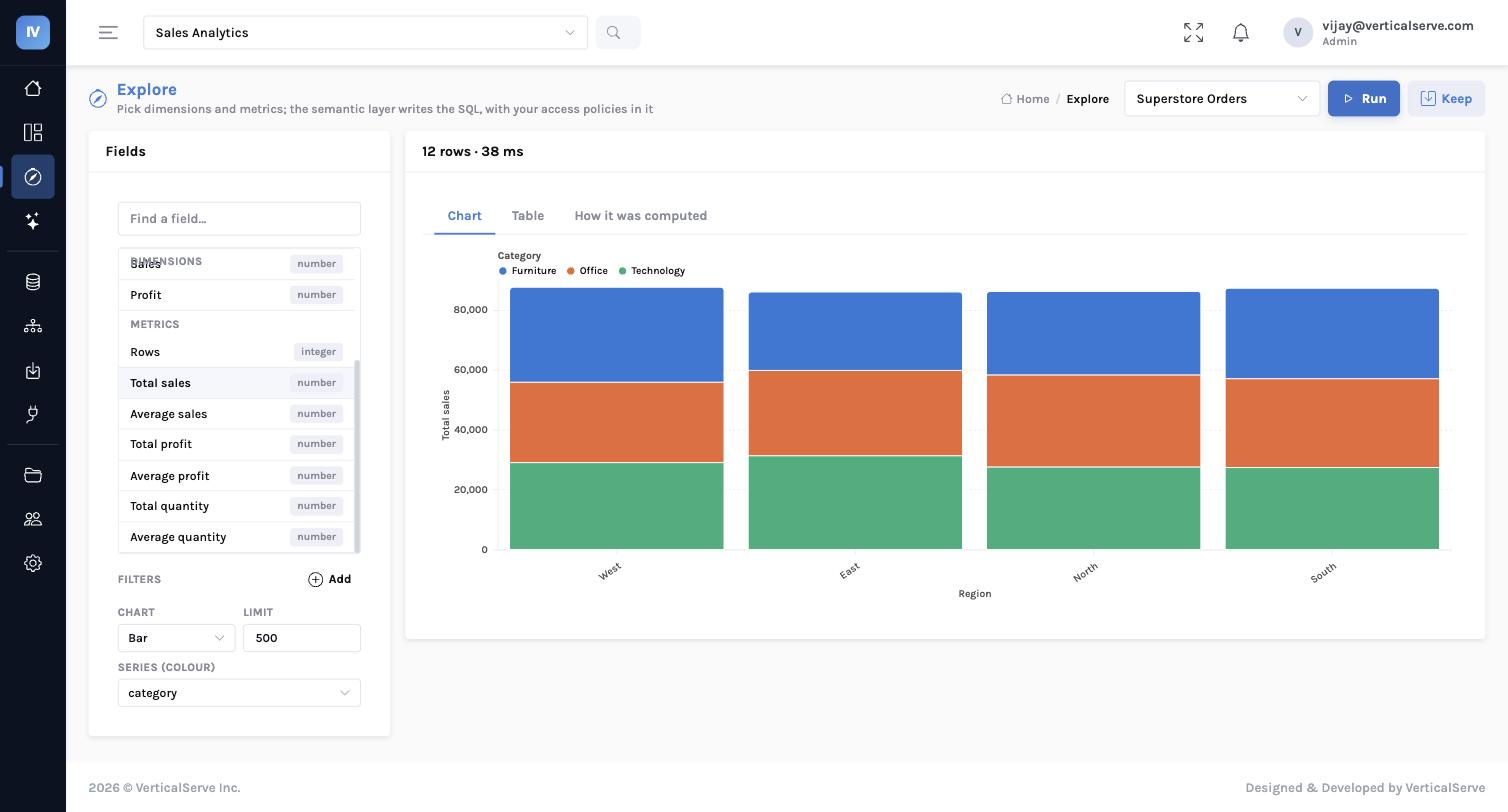
Choose a set of definitions, pick dimensions and metrics, add filters, choose a chart. The result appears as a chart and as a table, with a “how was this computed” view that shows exactly what was asked and which access rules applied. Keep the result as a saved question, or add it to a dashboard in one step.
Dashboards
A dashboard is a grid of charts, each with its own question. Filters across the top come from the business dimensions. Editing changes the document; publishing records a version with a note; any version can be restored. Every chart can explain how it was computed. Dashboards can be built from Explore, from an AI answer, or imported from Tableau.
Reading a dashboard
Most people who open a dashboard never build one. What they can do without help:
- Filter. Controls across the top come from the business dimensions, so they read like the business rather than like a table.
- Cross-filter. Click a mark and the panels it points at follow. Imported dashboards keep the click-to-filter behaviour the workbook had.
- Drill down. Click again to go a level deeper — region to category to product. The server works out which level that lands on from the model’s own hierarchies, so the page cannot be drilled somewhere it should not go.
- Parameters. A value someone picks that calculated fields read — a threshold, a scenario, a target. Imported Tableau parameter controls arrive as these.
- Maps. A dimension of countries, states or regions draws as a filled map. A value that cannot be placed is named rather than quietly left off.
- Export. Any dashboard downloads as a PDF or an image, sized to the dashboard rather than paginated onto A4.
- Ask about it. The assistant is on every page, for the follow-up the dashboard does not answer.
- See the working. Every panel shows the question it asked, the query it ran, and which access rules applied.
Dashboards paint from the last known numbers while fresh ones are fetched, so a page has something on it immediately. Anything shown that way is marked, with the time it was computed — an old number that looks current is worse than a blank panel.
AI Ask
Ask a question in plain words. The assistant works only from the business definitions of the dataset you choose — it never sees raw data and never invents a field. It asks, looks at the result, refines, then answers with the numbers and a chart. Every answer keeps its working: what was asked, what was seen, how it was drawn. Keep an answer as a saved question or place it on a dashboard.
Suggested questions appear when you open a new conversation, so people know what the data can answer. On a dashboard, they are written from the panels on it.
Why did this change?
Every chart and headline number carries a Why? button. Press it and InsightViz explains the change: it picks the latest period and the one before (or the period you clicked, or the same period last year), runs the panel’s own question broken down by every business dimension in both periods, and works out what drove the move — the contribution of each region, category or segment, which one moved the other way, and whether the change is concentrated or broad. It also says where the period sits in the trend: the lowest month in the series, the third fall in a row.
Everything on the panel is computed from the rows. A model is asked only to write a short summary over the ranked tables, and every figure in that summary is checked against them before it is shown; a summary that carries a figure the rows do not support is not shown. The mark beside each sentence says whether it traced. The queries that ran are listed under How this was computed, with the reader’s access rules inside them.
Under the explanation are the next steps, each a click: filter the dashboard to the driver, break the driver down by another dimension, add the average as a reference line, or set an alert at a threshold proposed from the series’ own variance. Below that, Ask about this: a question in words, answered only from the evidence on the panel plus at most one further governed query. When the rows cannot answer, it says so and names what would.
What changed runs the same comparison across every panel of a dashboard and ranks the moves — on the dashboard, on the Home page across every dashboard you can see, and in the body of a scheduled delivery above the attachment. In Explore, Why? explains the first metric of whatever you have just run.
At the foot of every explanation, Make this an insight keeps the question: see Insights.
- A ratio or an average (a profit ratio, an average order) is explained in points and by the members that moved most; shares are only computed for figures that add up.
- Dimensions that look like keys (ids, codes) are not tried; a dimension the reader may not see is never tried.
- A period with no data on one side is reported as such rather than compared.
Insights
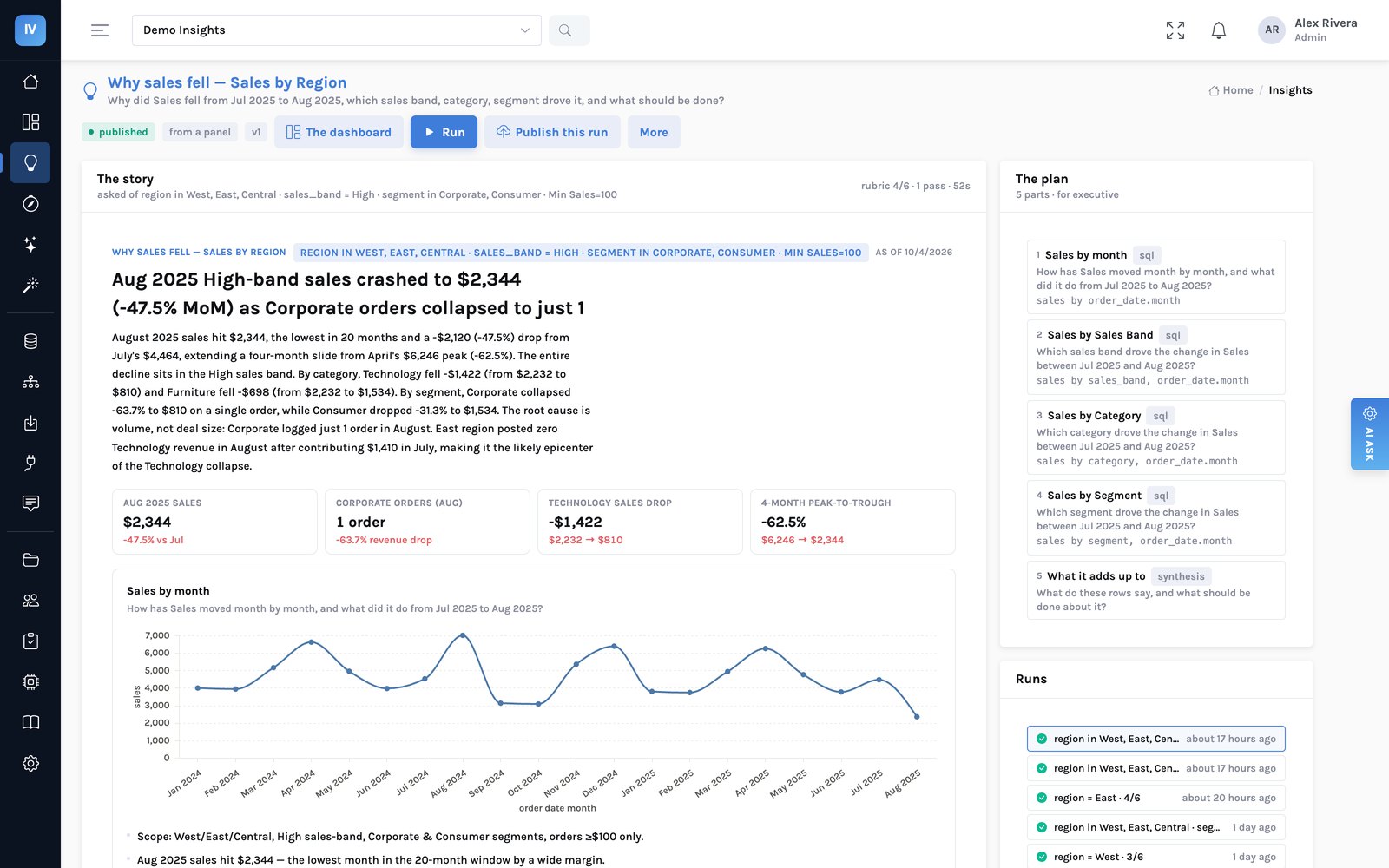
An explanation answers one question about one chart, once. An insight keeps the question. It is a short plan of parts — each a governed query through the same compiler and access rules as everything else — and a run turns the plan into a story: a headline, the figures that matter as tiles, each part’s chart and sentences, a synthesis, and what to do with an owner for each action.
- From a panel. Make this an insight under any Why? keeps that explanation: the trend, the breakdowns that drove it and a written synthesis.
- This week. One standing insight per dashboard: each panel’s latest period against the one before, kept to the panel’s own breakdown, and what to do this week.
- Proposed. The AI reads a dashboard and proposes questions worth asking of it; Build on this makes one your own draft.
- From a brief. A question in your own words over a model. The plan is shown before anything runs.
Every figure is checked. After a run, every number in every sentence is matched to the rows the parts returned — quoted directly, re-derived by one step of arithmetic, or found elsewhere in the table than the sentence claims — and marked. The share that traced is printed under the story. Click any claim to see where each of its figures came from, the rows it is about, and open it further by another dimension or over time. When the evidence leaves a gap, the run can add a part of its own to close it, and says so in its log.
Publishing. A run is a draft until it is published as a version. A story with figures that did not trace is refused at publish; publishing it anyway is possible, and the version then carries an untraced mark for everyone who opens it. Versions can be archived and restored, duplicated as a new draft, and an unpublished insight can be deleted.
On a dashboard. A published insight can be placed as a panel. It re-runs at the page’s filters — choose East and the story is about East — and a slice already worked out is served from cache, marked with when it was computed. Published insights are also listed on Home, and other applications read them through the same API.
What an insight is not. It explains what the rows show and says when they cannot answer. It does not know what happened outside the data, and a story is only as good as the share of its figures that trace — which is why that share is always on the page.
Alerts & subscriptions
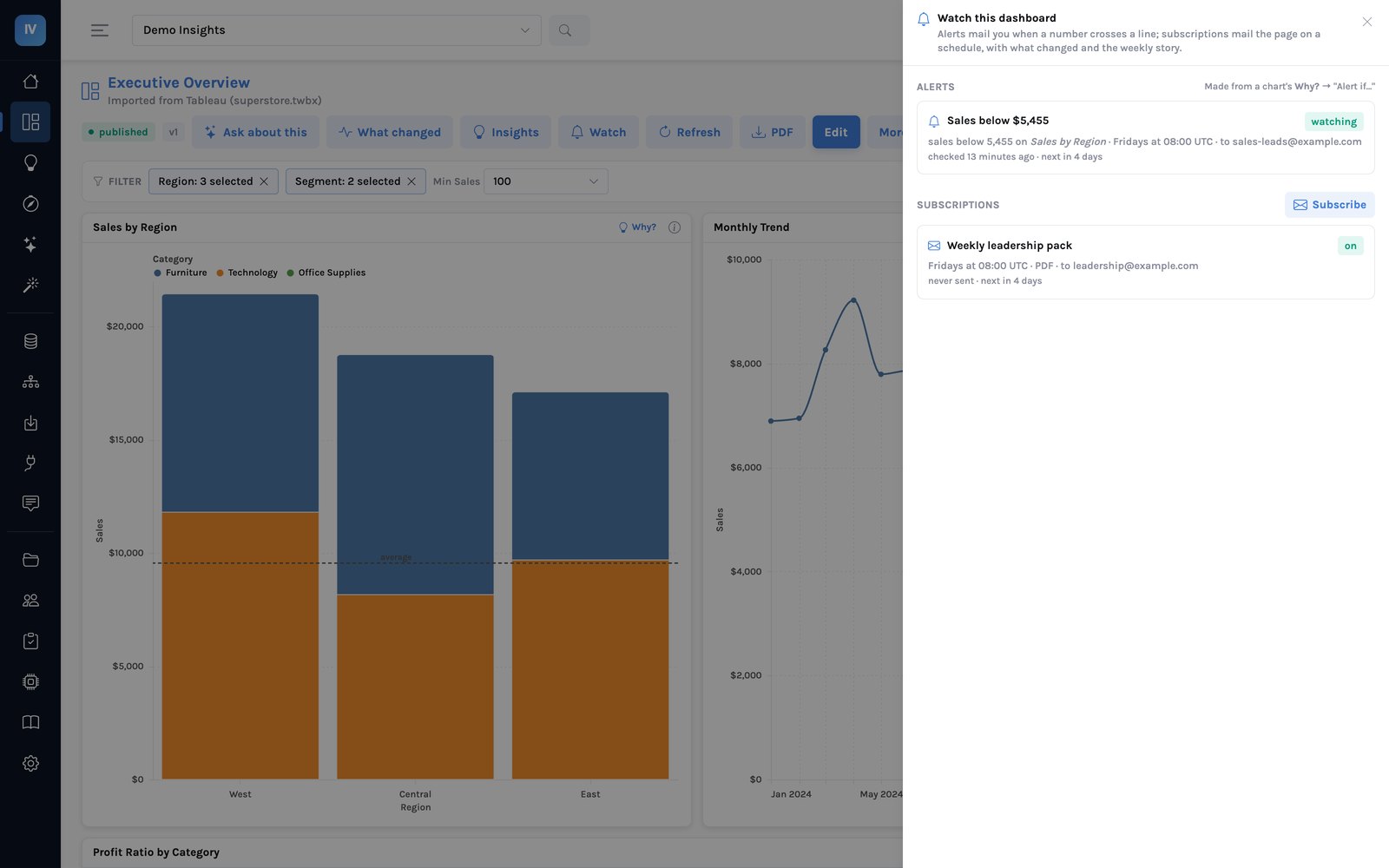
Watch on a dashboard holds both. An alert checks one panel’s figure on a schedule and mails its recipients when it crosses a line, and again when it recovers if you ask. Every Why? proposes one, with a threshold taken from the series’ own variance. Alerts can be paused, checked now, or deleted.
A subscription mails the dashboard as a PDF or an image on a schedule, with the filters it was made with. The body of the email carries What changed — the panels that moved most and the driver under each — and, when the dashboard’s weekly insight is published, its headline, summary and what to do. A draft story never goes out by email. Every delivery renders as the person who set it up, so their access rules apply to what is sent.
Migrate from Tableau
Drop a workbook or a packaged datasource on the Import page. The data comes across into your cloud; field names, roles and calculated fields become business definitions; sheets become charts and dashboards keep their layout.
Filters come across too, which is what makes the numbers match:
- Each sheet’s own filters — keep-only lists, exclusions, value and date ranges — stay on the chart they belong to.
- Quick filters become the dashboard’s own controls, starting on the selection the workbook had, and applying to the charts they applied to.
- Click-to-filter interactions carry: click a bar and the charts it pointed at follow, exactly as before.
- Sort order carries, so a top-ten list is still the same ten in the same order.
Calculations convert too, including fixed level-of-detail expressions and running totals and averages. Anything that cannot be carried — top-N and formula-based filters, INCLUDE and EXCLUDE expressions and the other table calculations that depend on a view, actions other than filter actions, web page tiles — is named in the review report against the sheet it came from, and that sheet is marked for review rather than passed as clean. A filter dropped quietly is a chart with the wrong number on it, so we do not drop them quietly.
- Supported:
.twbx,.tdsx,.twb,.tds,.hyper, plus CSV and spreadsheet files. - A workbook with a live connection and no data is reported with its connection details, so the same source can be connected directly.
- Parameter controls arrive as the dashboard’s own parameters; text tiles and image tiles come across (an image needs the packaged
.twbx, which carries the picture). - Highlight and URL actions are reported rather than recreated — only filter actions carry.
- Power BI files are on the roadmap. A screenshot of a Power BI page can already be rebuilt with From a picture; talk to us about your estate.
Security & access
- Sign-in through your identity provider (Okta, Microsoft Entra, Google) or local accounts; roles come from your directory.
- Workspaces control who can see and change what: owner, editor, viewer.
- Row access rules limit which records a person or role sees — a regional manager sees their region. Applied to every dashboard, exploration and AI answer.
- Column access rules hide fields from a person or role; they disappear from the definitions and cannot be asked for.
- Server-only datasets are never downloaded to a device.
- Audit trail of every question: who, from where, how many rows, how long — including questions that were refused.
Where it runs
InsightViz runs in your own cloud account on AWS, Azure or Google Cloud, with your identity provider, your storage and your choice of AI model provider — or hosted by VerticalServe to start in days. Your data stays in your cloud in an open format any tool can read. Talk to us about deployment.