Every migration has a long tail of pages nobody can export. A Power BI report from a team that left. A slide in the board pack that someone rebuilds by hand each quarter. A photo of a whiteboard from the planning offsite. There is no file to import, but there is a picture, and the picture says exactly which panels the business decided it needed.
The InsightViz builder has four ways in: describe a dashboard in words, design it panel by panel, import a Tableau workbook — and drop a picture of one. This post is about the last, because it is the one people assume is a trick, and the reason it is not is the same reason the rest of the product can be trusted.
What happens to the picture
flowchart LR
    P["A picture
PNG or JPEG"] --> R["Read
titles · chart types · rough layout"]
    R --> C["Planned in your terms
only fields your model has"]
    C --> K["Checked
every name against the catalogue"]
    K --> Q["Compiled
like any other panel"]
    Q --> V["A preview
and what could not be matched"]
The model that reads the image is asked to do one thing: say what each panel is — its title, its chart type, what it appears to measure and by what, roughly where it sits. It is given your model’s catalogue of dimensions and metrics and told to express every panel in those terms and no others. Then the plan goes through exactly the checks a dashboard composed from a sentence goes through: every field it names is looked up, every panel is compiled, and a panel that names nothing your data has is left out and listed.
The numbers in the picture are never used. A KPI tile that says $998.4K becomes a panel over your Total Sales metric; whatever your data says is what it shows.
A worked example
Here is a retail dashboard as a flat image — four headline numbers, sales by region, a monthly line, profit by category and a returns table — dropped onto the builder over the sample Superstore model that ships with the product:
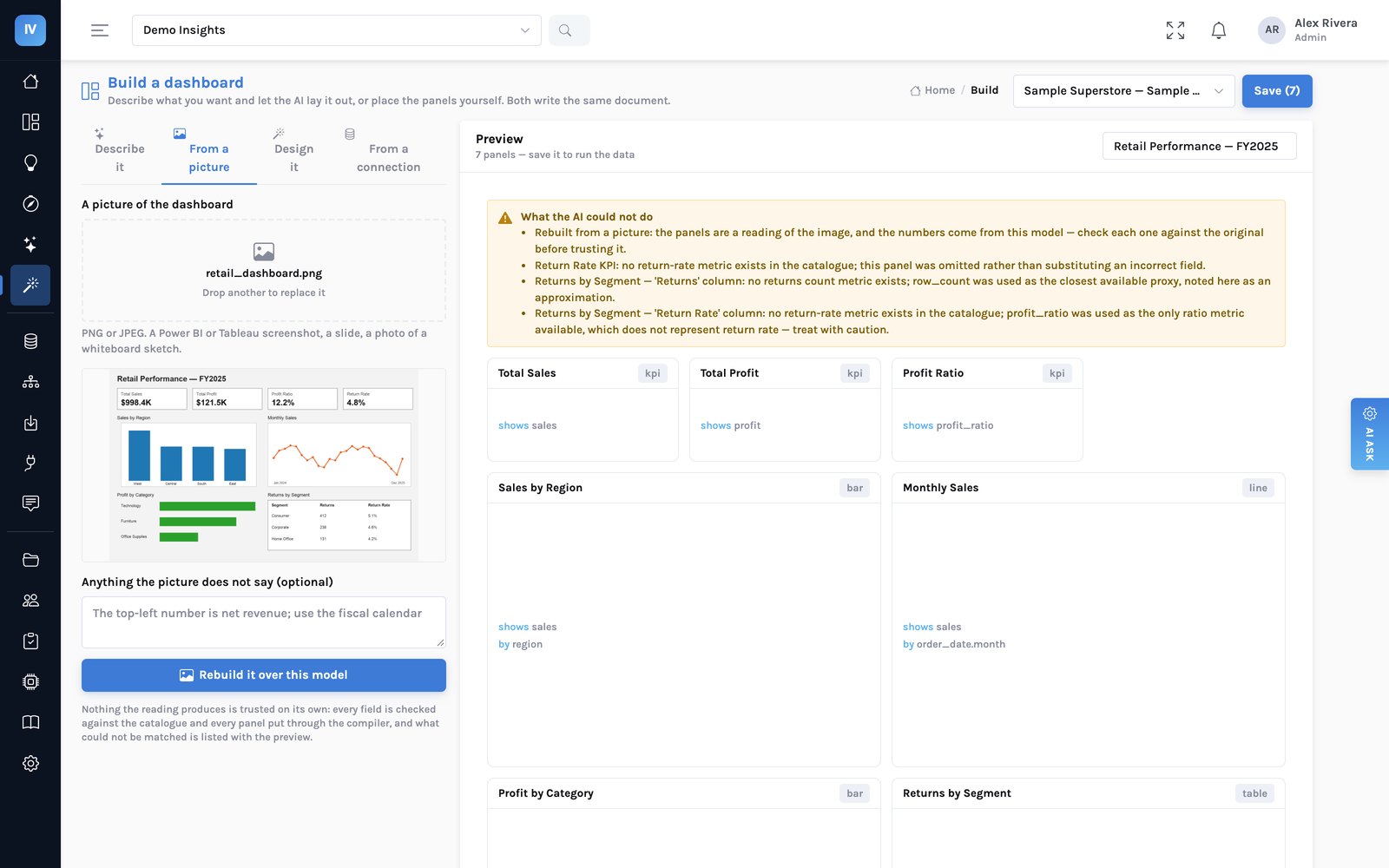
The sample model has sales, profit, quantity, region, category, segment and dates. It has no returns. The picture asks for returns twice. This is what came back, word for word from the builder:
| In the picture | What the builder did | Why |
|---|---|---|
| Total Sales, Total Profit, Profit Ratio tiles | Rebuilt as KPI panels | The model has all three |
| Sales by Region, Monthly Sales, Profit by Category | Rebuilt, same chart types | Region, category and order date exist |
| Return Rate tile | Left out | “No return-rate metric exists in the catalogue; this panel was omitted rather than substituting an incorrect field.” |
| Returns by Segment — Returns column | Stood in for, and named | “No returns count metric exists; row_count was used as the closest available proxy, noted here as an approximation.” |
| Returns by Segment — Return Rate column | Stood in for, and named | “profit_ratio was used as the only ratio metric available, which does not represent return rate — treat with caution.” |
Two of those substitutions are ones you would not keep. That is fine. The point is that you can see them before you press save, against the panel they apply to, in plain words — so the decision to delete the panel or to add a returns table to the model is yours, made in thirty seconds, rather than discovered in a meeting when someone asks why the return rate is twelve percent.
Return Rate shows a number, because the model found something rate-shaped and used it. Nothing on the page says the field was substituted. It looks finished, which is the problem.
The Return Rate tile is missing, and the list says why. The returns table is there with both of its stand-ins named. It looks unfinished, which is accurate.
Where it fits in a migration
A Tableau workbook should still be imported as a file: the file carries the calculations, the filters and the click-to-filter behaviour, and the import reports on each one. A picture carries none of that. What a picture is good for is everything that is not a Tableau file:
- Power BI pages. Importing Power BI files is on the roadmap. A screenshot of the page rebuilds its panels over your model today.
- Slides and spreadsheets. The board-pack chart someone rebuilds by hand each quarter becomes a dashboard panel that refreshes on its own.
- Sketches. A whiteboard photo from a planning session is a perfectly good brief. The layout is approximate, and the panels are real.
What a picture cannot tell you
A screenshot shows what a panel looked like, not how it was computed. Filters applied off-screen, a calculation behind a tile, a cross-filter click or a drill path — none of it is in the pixels, so none of it is carried. Colours and exact sizes are approximate. The reading is a model’s reading of an image, so check each panel against the original before you trust it; the builder says that at the top of every list. And the numbers will differ from the picture whenever your data differs from the data the picture was drawn from, which is the point.
Then it is a dashboard like any other
Nothing is saved until you press save. Once it is, the dashboard is a document like every other: edit any panel by hand, publish it with a note, restore an earlier version, press Why? on any chart, keep the explanation as an insight, and have the page mailed to the team on Monday. The picture was only ever a faster way of saying what you wanted.
Have a page you cannot export? Send us a screenshot and we will rebuild it on the call, over a model of your own data.