- contact@insightaiviz.com
For the people who sign off on BI
Your BI spend is mostly people who only look
A practical case for moving off Tableau and Power BI — what it costs to stay, what the move actually involves, and how to de-risk it.
Written for CIOs, heads of data and the managers who own the reporting. No architecture diagrams — the questions a buying committee actually asks.
The cost of standing still
Four things you are paying for that you would not buy again today
None of these are the fault of the tools. They are what happens when a BI estate runs for ten years.
Seats
Paying per head for people who only read
A large share of any BI licence bill is viewers — people who open a dashboard, change a filter and read a number. They generate no content and often log in once a week, and they are priced like authors.
- Viewer licences dominate the bill
- Renewals move with headcount, not value
- Teams ration access to control cost
- The people furthest from the data get it last
Drift
The same metric meaning three things
Net revenue is defined inside each workbook. Over years, copies diverge. Two teams bring two numbers to the same meeting and the meeting becomes about the numbers instead of the decision.
- Definitions live inside locked files
- No single place to change one
- Reconciliation work nobody budgeted for
- Trust erodes quietly, then all at once
Latency
A new question is a ticket
The dashboard answers what it was built to answer. Anything else queues behind an analyst. By the time it lands, the decision has usually been made without it.
- Weeks between question and answer
- Analysts doing request triage, not analysis
- Shadow spreadsheets fill the gap
- The estate grows another workbook
Opacity
Nobody can review a dashboard
A workbook is a binary. You cannot diff it, review it, or see what changed between last quarter and this one. Governance becomes a promise rather than a control.
- No code review for numbers
- Change history is a filename
- Access set per workbook, easy to miss
- Audits are archaeology
What changes
The three shifts that matter to you
Not features — the operating differences your team will feel in the first month.
The dashboard answers “why”
The question your managers ask every Monday and no BI tool answers. Press Why on a chart and InsightViz works out what drove the change from the rows, shows the evidence, and takes the follow-up questions — bounded by your definitions and access rules.
One definition, used everywhere
Metrics and dimensions are defined once, with business names, and every dashboard, exploration and AI answer draws on that same vocabulary. When a definition changes, it changes in one place and everything downstream follows.
Dashboards you can review
Every dashboard is a readable, versioned document. You can see what changed between versions, restore an earlier one, and publish with a note. The same review discipline your engineers already have, applied to the numbers the board reads.
Questions answered in the meeting
Anyone can ask in plain words and get a real number with a chart and the working shown — bounded by the approved definitions and by what that person is allowed to see. The ticket queue shortens because most of it never becomes a ticket.
The honest part
What a migration actually involves
Every BI vendor says migration is easy. Here is what is genuinely automatic, what needs a person, and how you find out which is which before you commit.
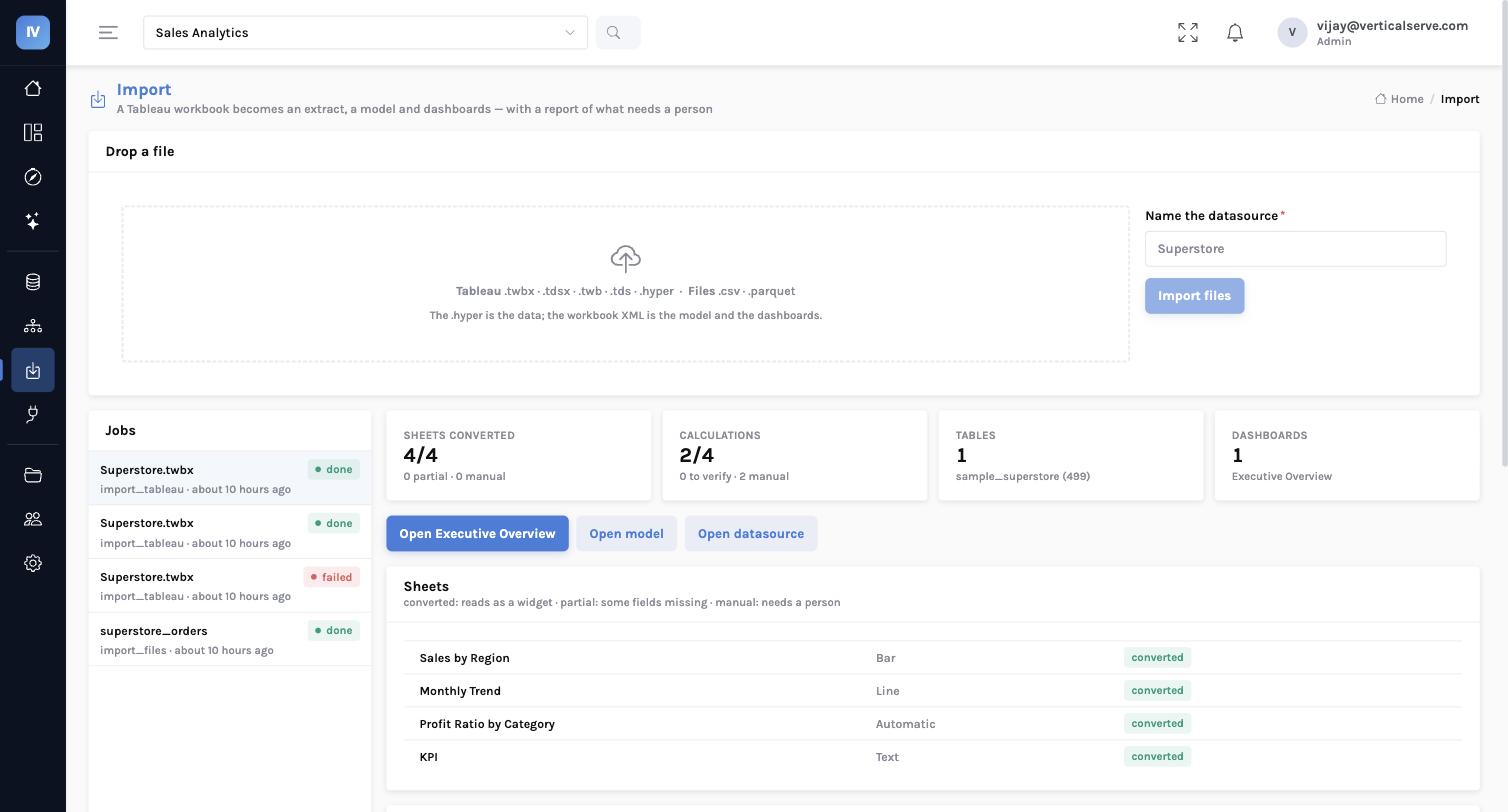
Drop a workbook in and you get a fidelity report before you migrate anything — sheet by sheet, calculation by calculation. On the sample workbook below, every sheet converted and every calculation translated. On a ten-year-old workbook with sixty sheets, it will not be everything, and the report will say so plainly rather than hand you a dashboard that quietly disagrees with the old one.
| What is in the workbook | What happens to it |
|---|---|
| The data | Comes across into your own cloud storage, in an open format, catalogued and queryable at once |
| Field names & roles | Become your business definitions, keeping the names your teams already use |
| Calculated fields | Translated automatically, including table calculations and fixed level-of-detail expressions |
| Sheets & layout | Become charts on a dashboard that keeps the arrangement people know |
| Filters & quick filters | Carry with the selections they had, on the charts they applied to — this is what makes the numbers match |
| Click-to-filter actions | Carry, so clicking a bar still filters the charts it always filtered |
| Colours & number formats | Carry, with a switch to keep them or adopt the InsightViz palette |
| INCLUDE / EXCLUDE level-of-detail | Reported for review — they are defined against a specific view, so they cannot be settled when the model is built |
| Top-N and relative-date filters | Reported against the sheet they came from, and that sheet is marked for review |
| Power BI (.pbix) | Not yet — the report layer is readable, the model needs the XMLA endpoint. Talk to us about your estate |
A filter dropped quietly is a chart with the wrong number on it. So nothing is dropped quietly: whatever cannot be carried is named, against the sheet it came from, and that sheet is marked for review rather than passed as clean.
The first 90 days
How this usually goes
A sequence that gets value out early and keeps the old estate running until you are ready.
1
Weeks 1–2 — Prove it on your own workbook
We deploy into your cloud with your identity provider and import a handful of real workbooks. You see the fidelity report on your own content, not a demo dataset.
2
Weeks 3–6 — Agree the definitions
The imported field names become a first draft of the business model. This is where the metric drift surfaces and gets settled — usually the most valuable part of the whole exercise.
3
Weeks 6–10 — Run both, compare
The migrated dashboards run alongside the originals. Numbers are compared, the review list is worked through, and access rules are set on the data rather than per workbook.
4
Weeks 10–13 — Move the readers first
Viewers move across — the largest group and the easiest, because they only read and filter. Authors follow as their workbooks are migrated. The old estate stays until its last dashboard is retired.
What your security team will ask
Answers, before they have to chase them
Where does the data live?
Your own cloud accountOpen format, any tool can read it
How do people sign in?
Okta, Entra, GoogleRoles from your directory
Who sees which rows?
Set once on the dataApplied to dashboards, Explore and AI alike
What can the AI reach?
Only approved definitionsNever raw data; refusals are logged