Monday, 8:40. The leadership meeting is at nine. The dashboard was refreshed overnight and is exactly as clear as it was last week: a bar chart, a trend line, a ratio by category. Somewhere in it is the one thing that moved. Finding it, working out why, and deciding whether anyone needs to act is the twenty minutes nobody has before nine — so it happens in the meeting, out loud, from memory.
Most BI tools answer this with a scheduled PDF. The PDF arrives on time and says nothing the dashboard did not; it is the same chart, in an attachment. This post is about the three things InsightViz sends instead, and the rule that decides what is allowed into the email.
From one answer to a story
Press Why? on a chart and InsightViz works out what drove the change — the two periods, the breakdown by every business dimension, the member that carried it — from the rows, under the reader’s own access rules. That answers one question about one chart, once. At the foot of the explanation is a button that keeps the question: Make this an insight.
An insight is a short plan of parts. Each part is a governed query through the same compiler as every dashboard panel; a run turns the plan into a story — a headline, the figures that matter as tiles, each part’s chart and sentences, a synthesis, and what to do with an owner against each action. This is the one made from the sample dashboard’s sales panel:
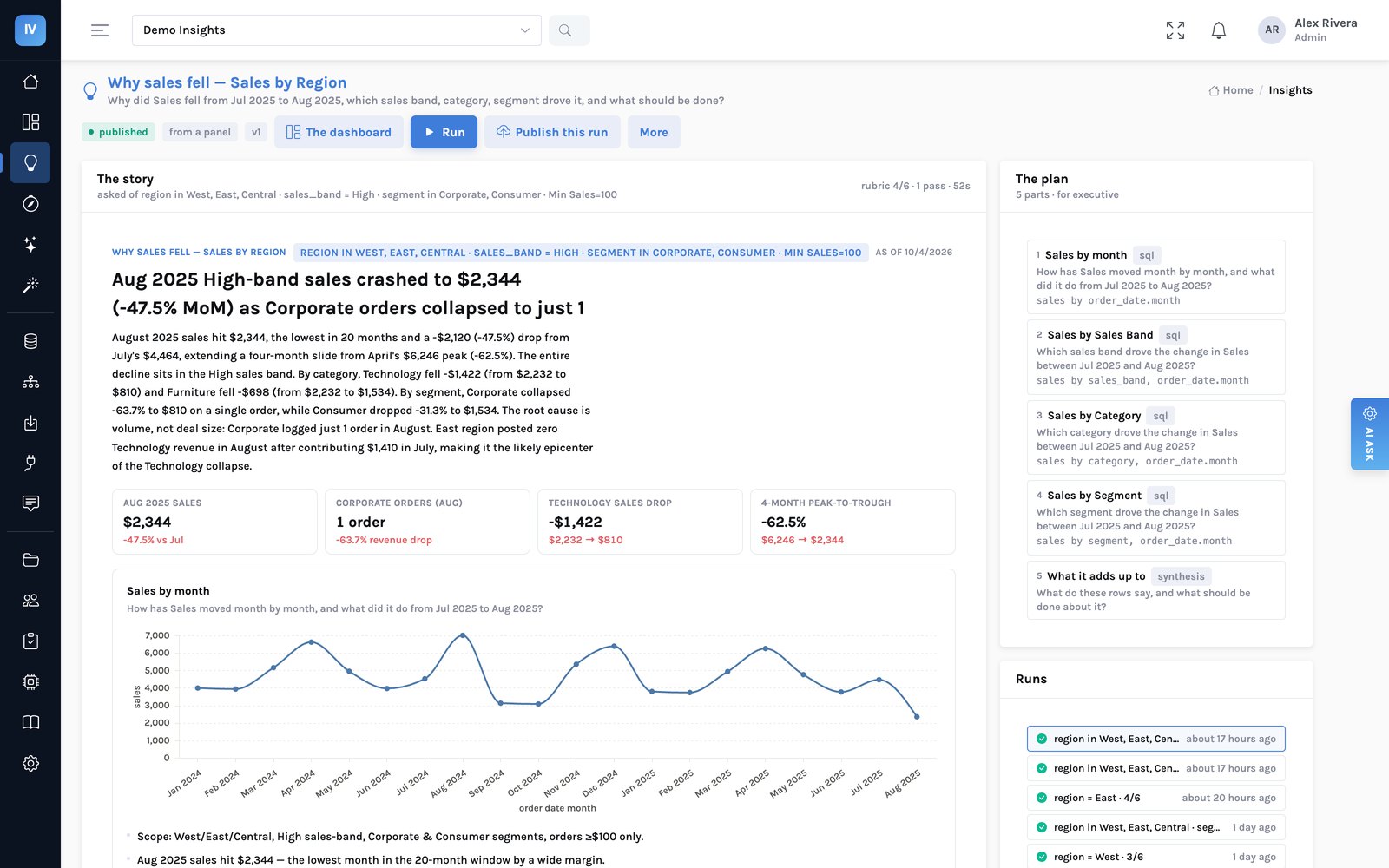
There are four ways to get one, and they end in the same place:
| Made from | What it holds | Who starts it |
|---|---|---|
| A panel | The explanation you just read, kept: the trend, the breakdowns that drove it, a synthesis | Anyone who pressed Why? |
| This week | One per dashboard: every panel’s latest period against the one before, kept to the panel’s own breakdown | The dashboard’s editor, once |
| A proposal | Questions the AI suggests are worth asking of the dashboard; Build on this makes one yours | Anyone, from the Insights sheet |
| A brief | A question in your own words over a model; the plan is shown before anything runs | An editor |
Every figure is checked, and the check is on the page
A story is sentences, and sentences are where a language model is most tempted to round, combine or invent. So after every run, every number in every sentence is matched back to the rows the parts returned: quoted directly from a cell, re-derived by one step of arithmetic between two cells, or found somewhere in the table other than where the sentence puts it. The mark beside each claim says which. Click one and the sheet behind it opens:
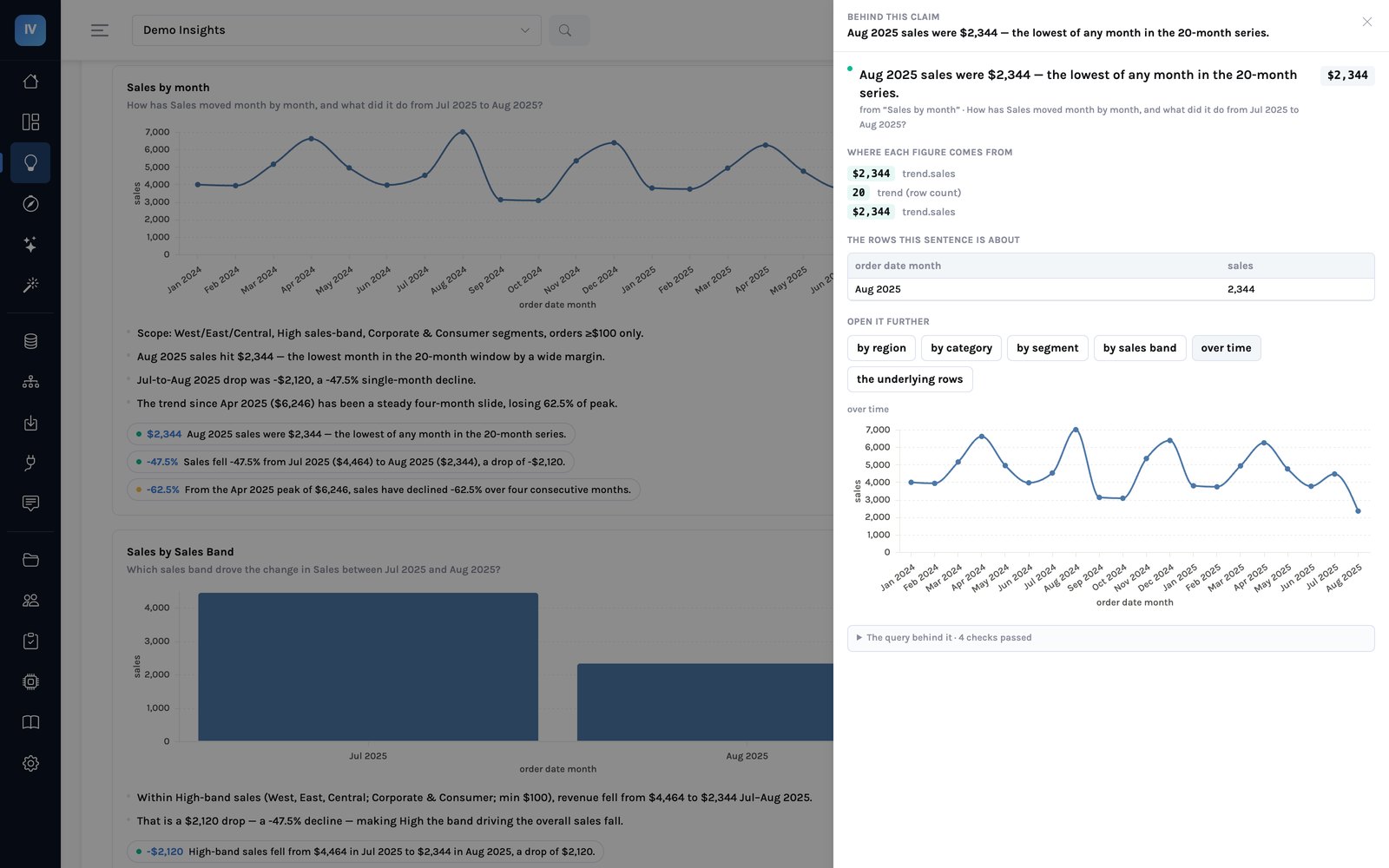
Two things follow from that check, and they are the rest of this post. A story with figures that did not trace cannot be published without someone saying so on the record. And only a published story ever leaves the building.
flowchart LR
    A["A question
panel · this week · proposal · brief"] --> B["The plan
parts, each a governed query"]
    B --> C["A run
charts · sentences · synthesis"]
    C --> D["Every figure matched
to the rows it came from"]
    D --> E{"Publish"}
    E -- all traced --> F["A version
readers · dashboard panel · email"]
    E -- untraced --> G["Refused — or published
with an untraced mark"]
On the page the team already opens
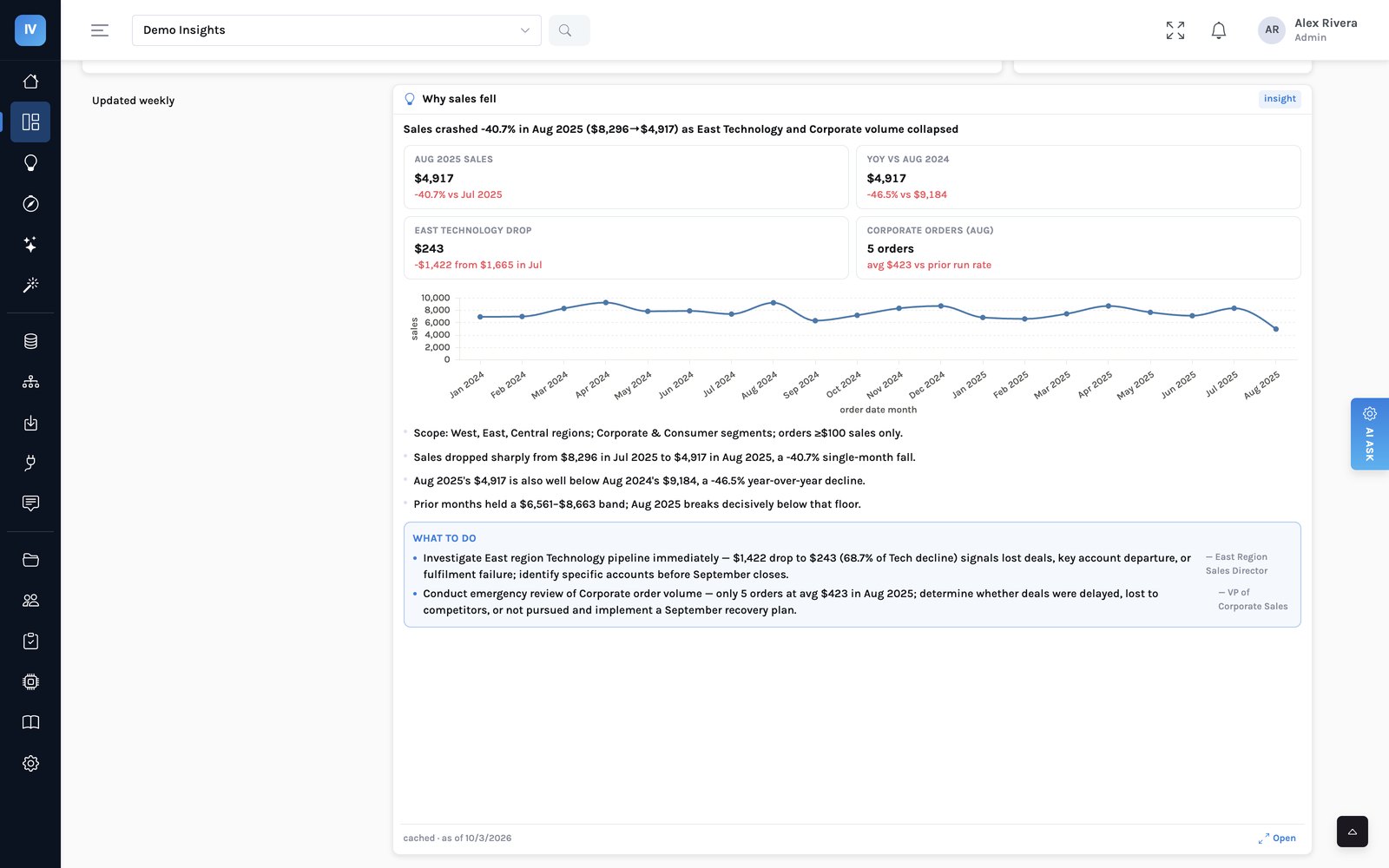
A published insight can sit on the dashboard grid like any other panel. It re-runs at the page’s filters: choose East and the story is about East, with East’s figures traced against East’s rows. A slice that was already worked out is served from cache and says when it was computed, because an old number that looks current is worse than a blank.
Then make it arrive
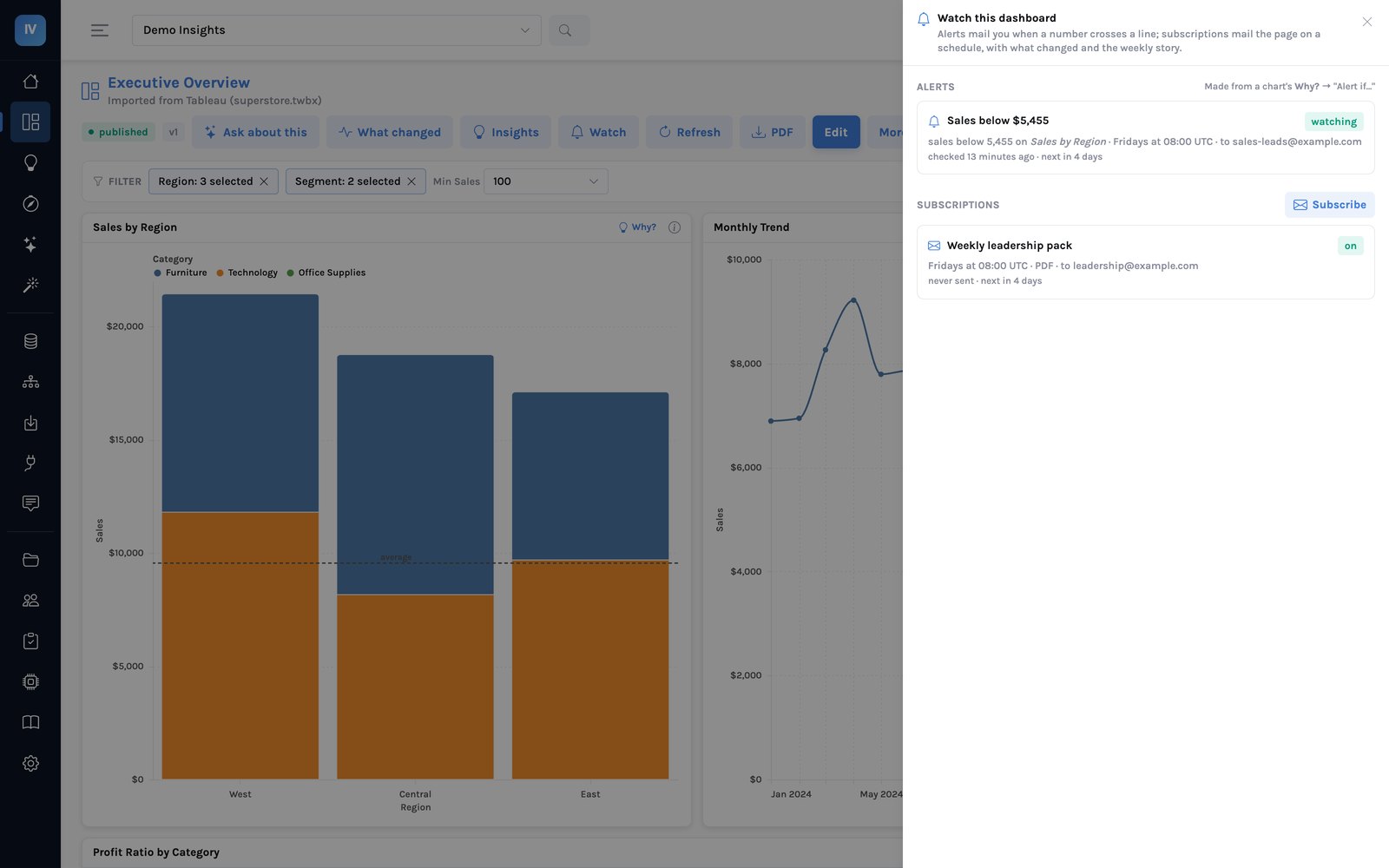
Watch on the dashboard holds the two things that turn a page into something that comes to you. An alert checks one panel’s figure on a schedule and mails its recipients when it crosses a line — and every Why? proposes one, with a threshold taken from the series’ own variance rather than a round number someone guessed. A subscription mails the dashboard as a PDF or an image on a schedule, with the filters it was made with.
What makes the subscription different is the body of the email. Above the attachment it carries What changed — the panels that moved most since the previous period, with the driver under each — and, when the dashboard’s weekly insight is published, its headline, its summary and what to do. The person reading on a phone at 8:40 has the two lines that matter and the reason before they open anything.
| In the email | Where it comes from | Checked? |
|---|---|---|
| The dashboard, as a PDF or image | Rendered as the subscriber, with the subscription’s filters | Their access rules apply |
| What changed | Every panel’s latest period against the one before, ranked | Computed, not written |
| The weekly story’s headline, summary and actions | The latest run of the published version only | Passed the publish check |
| A draft story | — | Never sent |
Why a draft never goes out
Publishing is where a story with untraced figures is refused. If the email carried the latest run regardless, the check would be a page in the console that a scheduled job walks straight past. An email is a copy of the data that leaves the building and is forwarded without its context; it gets the stricter rule, not the looser one. A dashboard with a weekly insight still in draft sends its PDF and What changed, and no story.
None of that needed an analyst on Monday morning, and none of it said anything the rows do not support. The analyst’s afternoon went into the question the story raised and could not answer — why Corporate ordered less — which is the afternoon worth having.
What it does not do
- It does not know the world. A story explains what the rows show. Why a customer ordered less is a question for a person; the story says that, and names what would answer it.
- It is only as good as its traced share. The share of figures that traced is printed under every story. A story at sixty percent is a draft worth reading and not one worth sending, which is the point of the publish check.
- It compares periods the way the data is grouped. A brief that asks about “early versus late 2025” is answered from monthly rows unless the plan groups them. The planner is told to group them, but a story can still lean on single months — read the question and the grain printed on each part.
- Schedules run in UTC. Pick the hour accordingly; the panel says which time zone it means.
If your Monday starts with someone screenshotting a chart into a chat and asking “anyone know why?”, that is the meeting this was built to get ahead of. Bring one of your dashboards and we will set the weekly story up on it.