A regional director opens the Monday dashboard. Sales are down. The chart is perfectly clear about that. It is silent on everything she actually needs: was it one region or all of them, one product line or the whole range, one bad week or a slide that started in June, and is this the lowest it has been. Those four questions are the meeting. The chart answers none of them.
In InsightViz the chart has a button on it that says Why?. Here is what it does on the sample workbook that ships with the product:
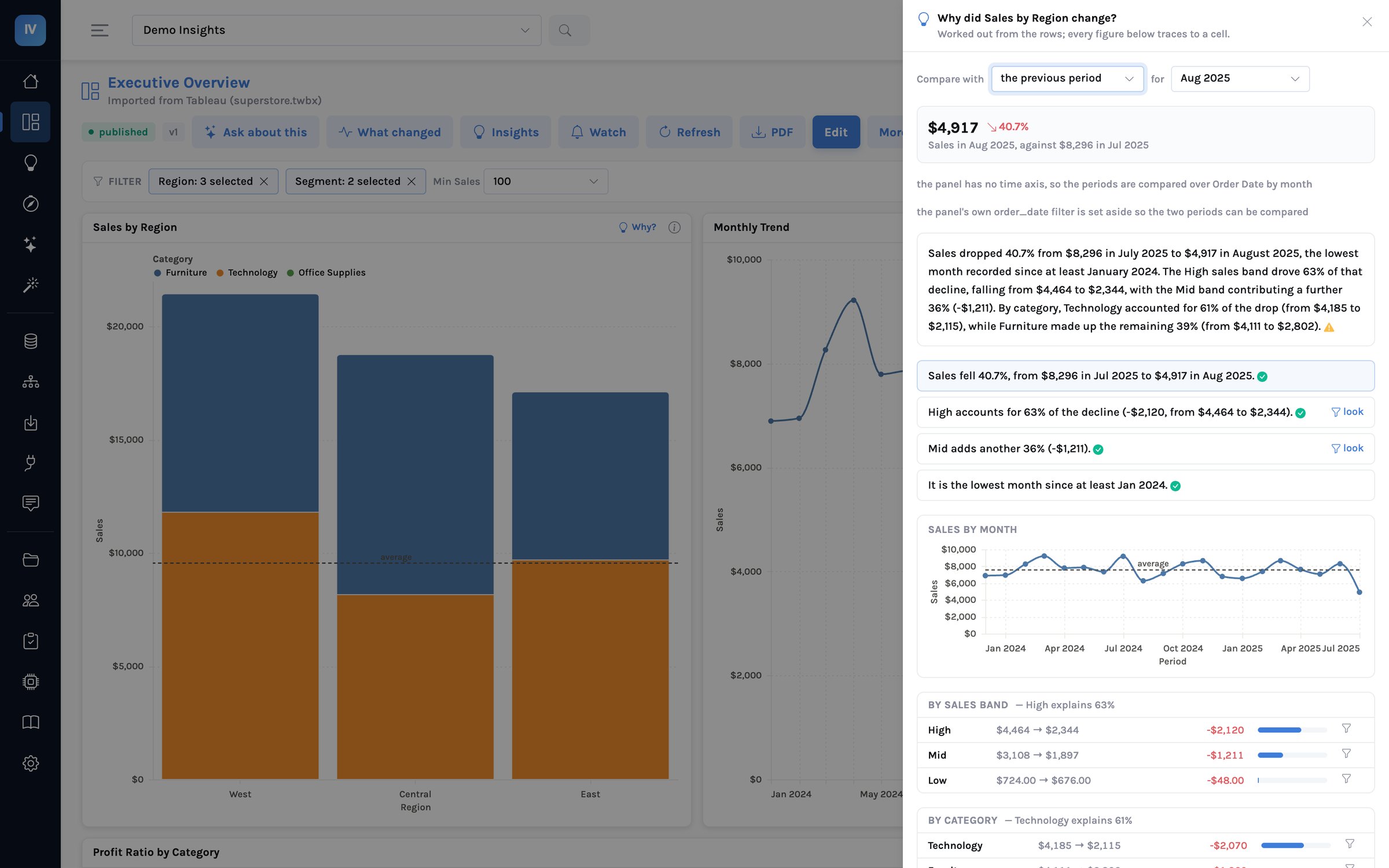
Nothing on that panel was written by a language model. The two periods, the contribution of every region, category, segment and sales band, the ranking, the member that moved the other way and the sentences themselves are all computed. A model is asked, optionally, to write a three-sentence summary over the ranked tables — and that summary is then checked figure by figure against those tables before anyone sees it. If none of its figures trace, it is not shown; if only some do, it is shown with a warning mark beside it, so the reader knows which sentences to lean on.
What “worked out” means
The explanation is a short, fixed procedure that runs through the same query compiler every dashboard uses, with the reader’s own access rules inside every query. It never writes SQL of its own and never sees a table the reader may not.
flowchart LR
    A["Press Why on a panel"] --> B["Pick the two periods
latest vs previous, or a click"]
    B --> C["One governed query per dimension
the same figure, by member, in both periods"]
    C --> D["Arithmetic
contribution · share · rank · opposite movers"]
    D --> E["Sentences from the numbers
headline · driver · trend"]
    E --> F{"A model writes
a 3-sentence summary?"}
    F -- yes --> G["Every figure traced
back to the tables"]
    F -- no --> H["Shown as computed"]
    G -- traced --> H
    G -- invented --> X["Dropped, with a note"]
Three properties fall out of that order, and they are the reason a finance director will trust the panel where they would not trust a chat window:
- It cannot invent a cause. A sentence only ever says what a row supports. “West fell because of two lost accounts” can be said if the rows show it; “because of the weather” cannot be said at all.
- It respects who is asking. A regional manager who may only see their region gets an explanation of their region. The rules are in the queries, so there is no version of the answer that leaks.
- It is fast enough to click. A handful of grouped queries on a governed extract takes a few hundred milliseconds. The sample dashboard explains itself in under a second.
The worked example, in numbers
The unfiltered version of the same panel — every region and every segment — gives the figures below. This is the sample workbook every trial starts with, so you can reproduce it exactly.
| What the panel says | Where it comes from |
|---|---|
| Sales fell 32.0%, from $16,164 in Jul 2025 to $10,989 in Aug 2025. | The figure per month; the two cells and the ratio between them |
| High accounts for 54% of the decline (−$2,817, from $9,051 to $6,234). | Sales by sales band in both months; the band’s change over the total change |
| Technology explains 50%; Corporate explains 50%. | The same figure by category and by segment — both broad, neither the story |
| It is the lowest month since at least Jan 2024. | The twenty months on the trend |
| Alert if Sales falls below $11,485. | Two standard deviations under the twenty-month average — proposed, one click to set |
Notice what the ranking did. Three dimensions each have a member that “explains” about half the decline. That is not three causes; it is what an even split looks like when a dimension has two or three members. The panel scores each dimension by how far its leader is above an even split, so a genuinely concentrated driver ranks above a large member of a small dimension. When nothing is concentrated it says so: the decline is broad; no single region explains more than 39% of it.
Every step is either a click on something the panel already computed or a question answered from the panel’s own evidence. The one time the evidence was not enough, the assistant ran one more governed query and showed it — it did not guess, and it did not go and read the whole warehouse.
What a chat window does instead
Half of that sentence is a number the model read from a query. The other half is a cause it made up, because the question asked for one and the rows did not contain it. There is no mark that says which half is which.
Every figure is a cell or a ratio of two cells. The word because never appears unless a row supports it. When the rows cannot answer, the panel says what would.
This is the same rule the product applies to every question — a query may only use the approved definitions, an answer may only use the rows it was given — carried one step further, to the sentence. It is why the panel can sit in front of a CFO. The chat box has to sit in front of an analyst who checks it.
What changed, before you ask
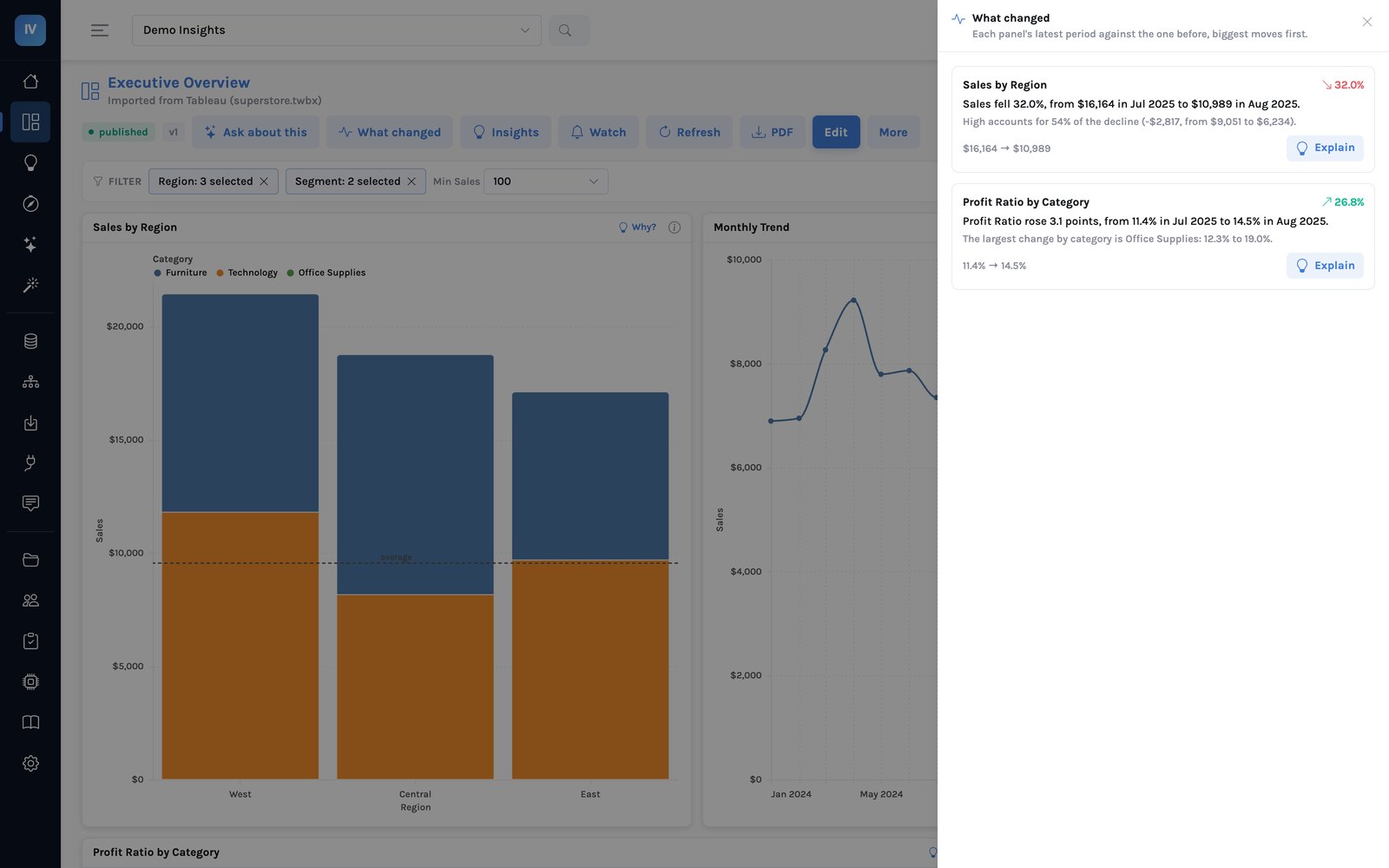
The same procedure runs across every panel of a dashboard, latest period against the one before, and ranks the moves. It is on the dashboard as What changed, on the Home page across every dashboard you can see, and in the body of the scheduled email above the attachment — so the person who reads the Monday PDF sees the two lines that matter before they open it.
What it will not do
The panel explains what the data shows. It does not know what happened in the world. “High-band sales fell because two Technology orders in August were half the size of July’s” is what it can say; why those customers ordered less is a question for a person, and the honest answer to it is a phone call, not a chart. The product says exactly that, in one sentence, and names what would answer it.
Keep the question
At the foot of every explanation is Make this an insight. It keeps the question rather than the answer: the trend, the breakdowns that drove it and a written synthesis become a story that re-runs whenever the data does, at whatever filters the reader has on, with every figure traced the same way. Published, it can sit on the dashboard as a panel and go out in the Monday email. The next post is about that.
Try it on your own numbers
Every InsightViz trial starts with the sample workbook above, so the first thing your team clicks is the panel in this post. Import one of your own workbooks and the same button is on every chart it produces — the explanation runs on your definitions, under your access rules, in your cloud.