A manager in a Tuesday review asks: which region has the weakest profit ratio, and how has it trended this year? The dashboard on screen does not break it down that way. In most organisations that question becomes a message to an analyst and an answer on Thursday, by which point the meeting has moved on and the decision has been made without it.
Here is that exact question, asked and answered in the room:
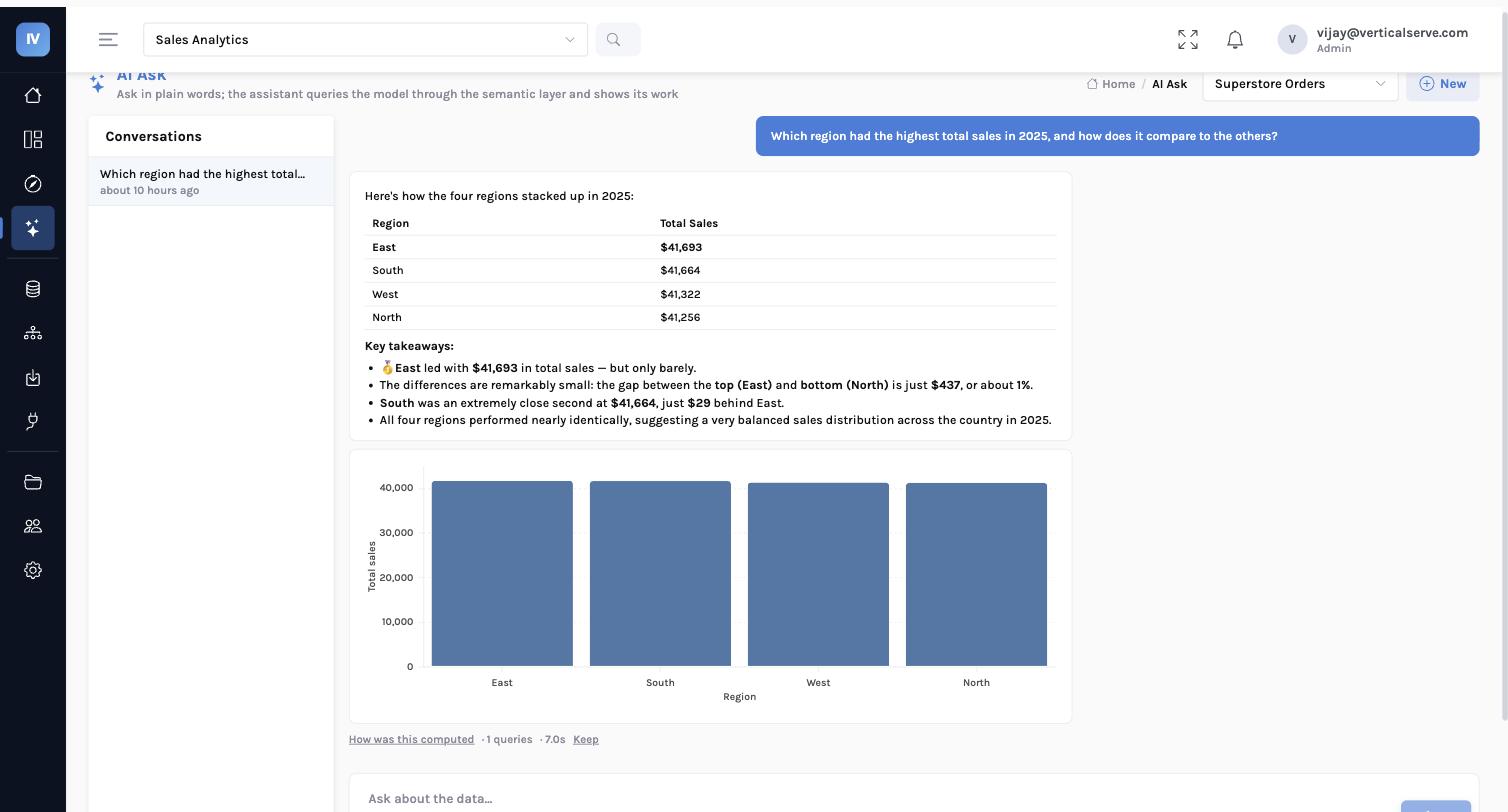
The region was the easy part. The valuable part is the shape of the year — that the weakness is two bad months rather than a slow decline, which points at discounting or a handful of large low-margin orders rather than at a structural problem. Getting that on Thursday is worth much less than getting it while the room is still discussing it.
Each of those five would have been a separate ticket. More importantly, questions three, four and five only exist because the previous answer arrived while the room was still thinking. A three-day turnaround does not produce that chain at all — it produces one question, answered after the meeting, and no chain.
Why most BI chat boxes cannot be trusted
The common design hands the model a database connection and asks it to write SQL. It fails in three predictable ways, and every one of them is quiet.
| Failure | What happens | What the reader sees |
|---|---|---|
| The wrong join | A key that looks right, rows silently multiplied by a one-to-many relationship nobody declared. | A total that is twice the truth |
| A different definition | The model sums a revenue column. Finance’s dashboard subtracts discounts and returns. Both are now in circulation. | Two numbers, one meeting |
| An invented field | Asked about customer tier, the model produces something confident. The field does not exist in your data. | A plausible answer about nothing |
None of these announce themselves. They do not error. They arrive as a well-formatted number in a meeting, and they are discovered weeks later, if at all.
Why prompting does not fix this
The usual response is a longer system prompt — “always use the revenue_net column, never join orders to line_items without…”. That is a rule written in prose and enforced by hope. It works most of the time, which is the worst possible failure rate for a number somebody is going to quote to a board.
The fix is a smaller surface, not a bigger model
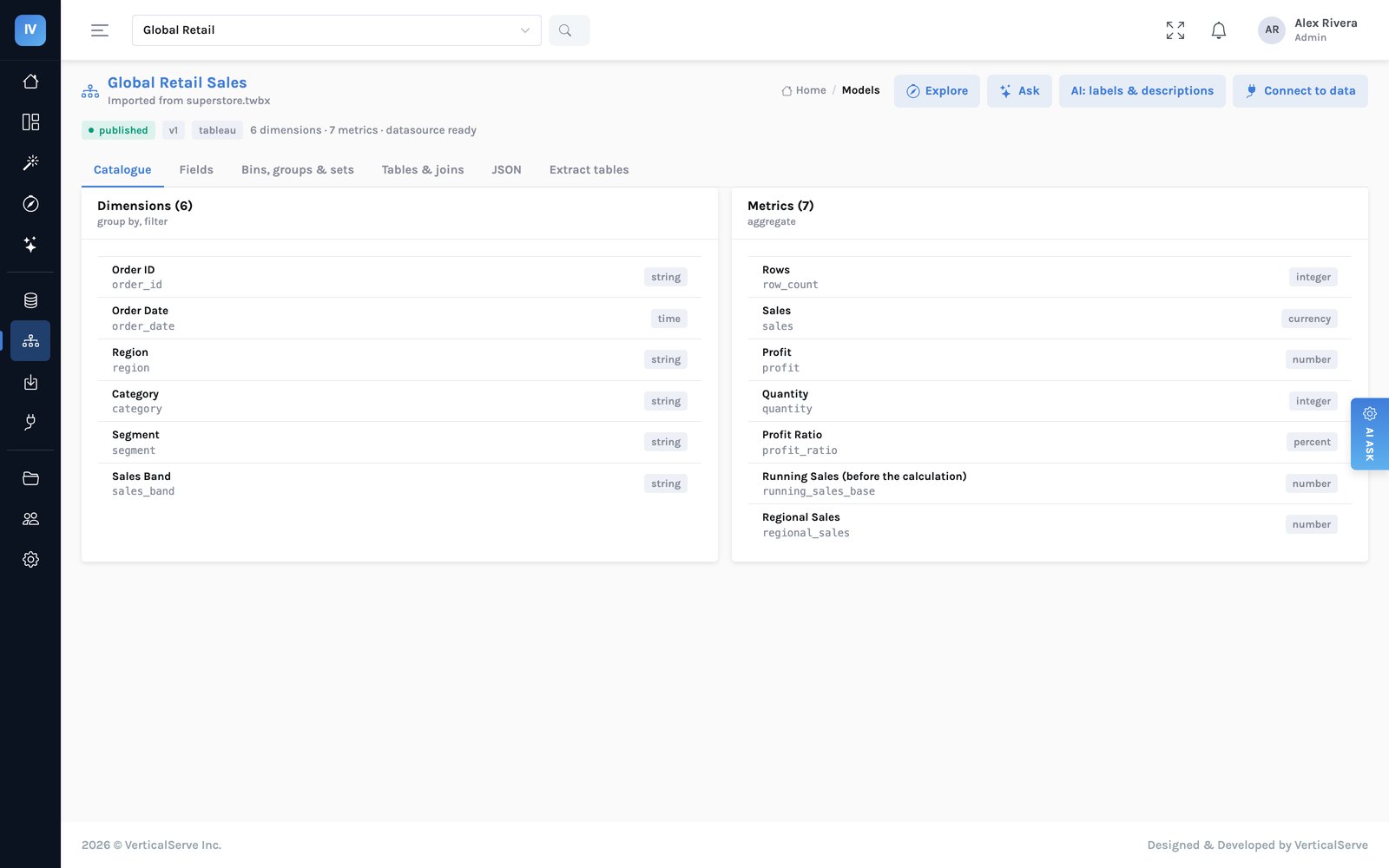
The assistant in InsightViz is never given raw data and never given a database connection. It is given your business definitions — the metrics and dimensions your teams agreed on, with plain-English names, descriptions and the other words people use for them — and its only job is to choose from that list. InsightViz turns the choice into the query.
Given a connection and a schema, asked to produce a query. Every join, every aggregation and every column name is a decision the model makes in the moment, and a wrong one still runs.
Given a list of approved metrics and dimensions, asked which ones answer the question. The joins were declared once by a person. A name that is not on the list cannot be chosen.
flowchart TD
    Q["A question in plain words"] --> A["The assistant picks from
approved definitions only"]
    A -->|"names a field that
does not exist"| X["Refused and named
never invented"]
    A --> C["The compiler builds the query"]
    C --> P["Your row and column rules
are applied here"]
    P --> E["The engine runs it"]
    E --> R["Number + chart
+ the query, shown"]
    R --> L["Written to the audit log
including refusals"]
    style A fill:#eef1ff,stroke:#c7cdf2
    style P fill:#fff4e6,stroke:#f0cb9a
    style X fill:#fdecec,stroke:#eab6b6
    style R fill:#e6f7f2,stroke:#9fd8c9
Each failure mode above is closed by construction rather than by instruction:
- The joins are declared once in the model, so the assistant never picks one. There is no prompt to get wrong.
- Net revenue is defined once and used by every dashboard and every answer, so the two cannot disagree. If the definition is wrong, it is wrong everywhere at once — which is a fixable problem rather than a reconciliation problem.
- A field that is not in the catalogue cannot be selected, so an invented one is refused and named. The answer becomes “this model has no customer tier” instead of a number.
The access rules are the same rules
Row and column access is applied when the query is built, not filtered out of the results afterwards. A regional manager asking “which region is weakest” gets an answer about their own region, because the restriction is inside the query. A column someone may not see is not hidden from the chart — it is absent from the vocabulary, so it cannot be charted, exported, or asked about at all.
Every answer carries its working
An assistant that is right most of the time is only useful if a reader can check it without asking the person who built it. Every answer, and every panel on every dashboard, will show the question that was asked, the query that ran, and which access rules applied.
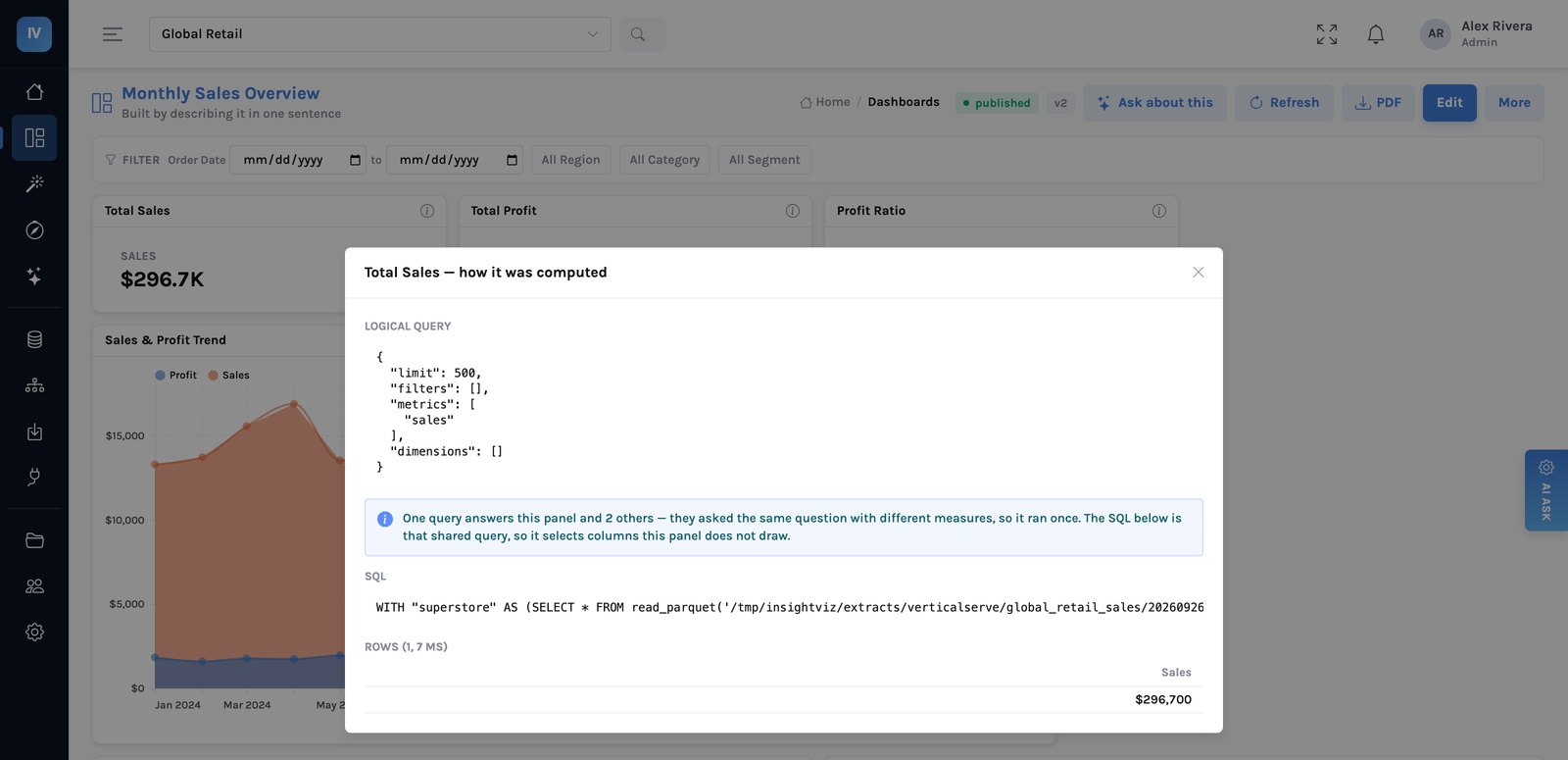
This is the feature that decides whether an organisation actually adopts an AI answer or quietly keeps asking the analyst to double-check it. When someone challenges a figure in a meeting, the answer is on screen rather than in somebody’s head.
The question you no longer have to type
Since this post was first written the assistant has moved onto the chart. The Tuesday question above — which region has the weakest profit ratio, and why — no longer needs to be typed at all. Every chart and headline number carries a Why? button; press it and the change is worked out from the rows before a model is asked anything: the two periods, the contribution of every region, category and segment, the member that moved the other way, and where the period sits in the trend.
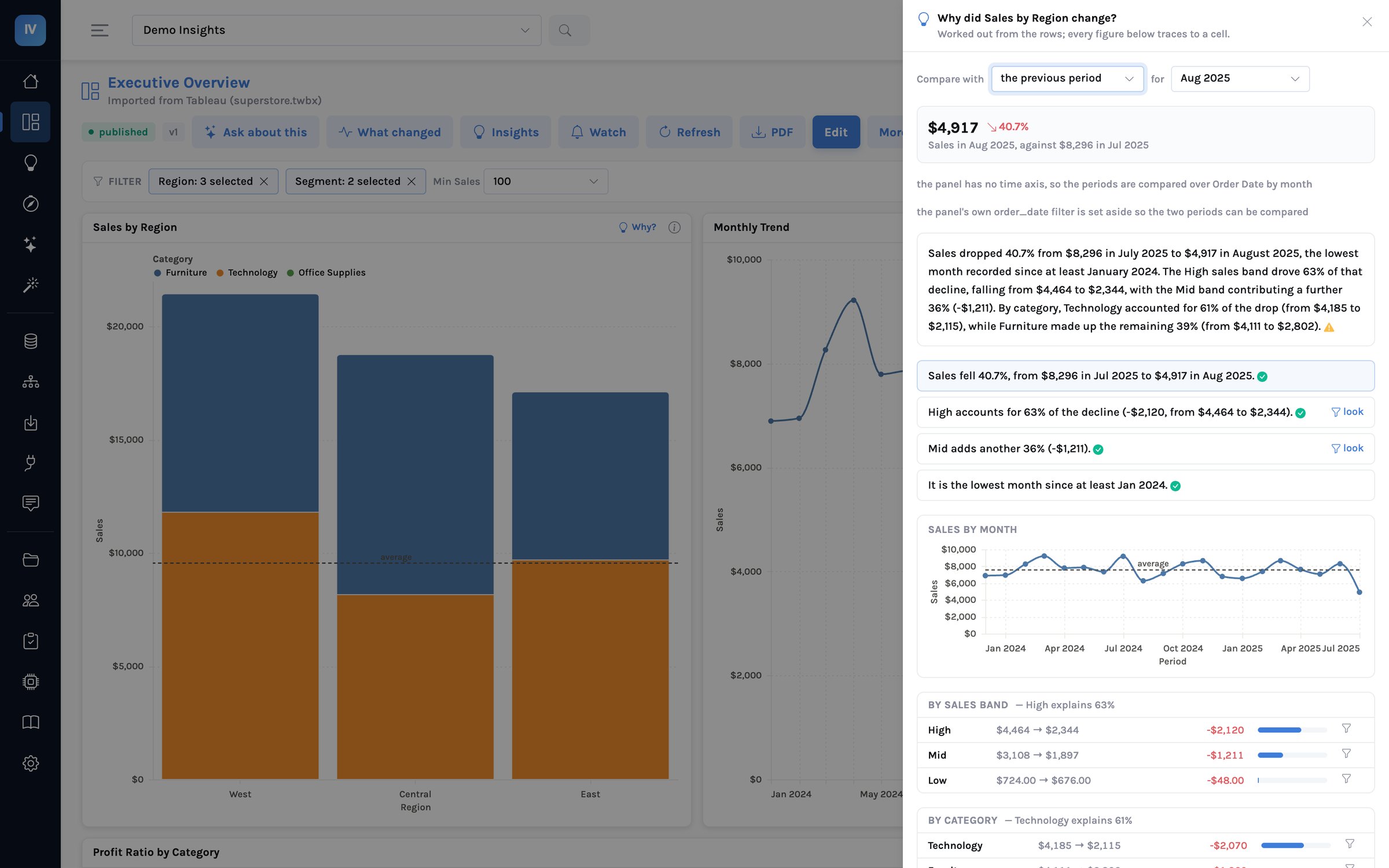
The conversation is still there — Ask about this sits under the explanation — but its evidence is now the panel: the claims, the trend, the breakdowns, and at most one further governed query when those cannot answer. That is the same rule as the rest of this post, applied one level down: the query may only use the approved definitions, and now the sentence may only use the rows. The full worked example is here →
What actually changes in the organisation
Three things, in roughly this order, over the first quarter.
| When | What changes | Why it happens |
|---|---|---|
| Weeks 1–3 | The ticket queue shortens from the bottom. | The small questions — break this down by segment, compare with last quarter — stop becoming tickets. That is most of the queue by count and the part analysts resent. |
| Weeks 3–8 | Meetings change shape. | The follow-up gets asked while the decision is still open, rather than being noted for next time. People stop pre-building six variants of a dashboard in case someone asks. |
| Weeks 4–12 | The definitions get settled. | Nobody predicts this one. When everyone asks the same vocabulary, disagreements about what a metric means surface in week two — and now there is one place to resolve them. |
The third is the one that pays for the project. Metric drift is invisible while every team has its own workbook; it becomes obvious and fixable the moment there is a shared vocabulary that everything else draws on.
What it does not do
It does not replace your analysts, and anyone selling that is selling a demo. It answers questions your model can already express. A genuinely new question — one that needs a table you have not connected, a join nobody declared, a metric nobody defined — still needs a person, and that is the work analysts should be doing rather than re-cutting the same report six ways.
It is also not a replacement for a dashboard. A number someone looks at every morning belongs on a page, not behind a question that has to be re-asked and re-read each time. The assistant is for the long tail, which happens to be most of the questions.
And it will not guess. When a question needs a field the model does not have, it says so. In a tool people are going to quote in meetings, refusing is the feature that matters most.
An assistant that is confidently wrong once will not be trusted again, whatever it does for the rest of the year.
See the full business case → · How the semantic layer bounds the assistant →